

Managing Editor
@ShahidNShah
@ShahidNShah
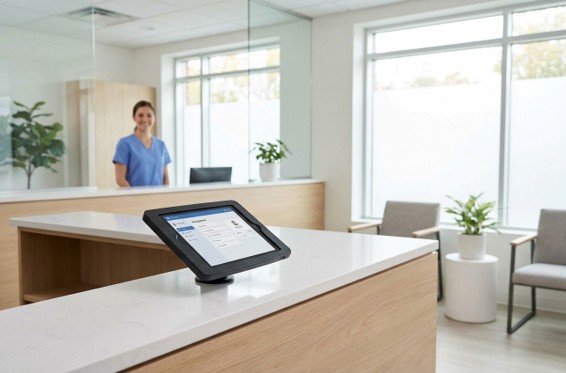
The best fixes for an efficient clinic include streamlining check-in hardware, improving digital intake capture, and standardizing staff devices. Implementing these specific hardware configurations allows administrators to measurably improve outpatient practice efficiency.
These changes do not require massive system overhauls to be effective.
Clinic stress rarely originates from a single catastrophic system failure. It accumulates through dozens of small physical and technical friction points at check-in, intake, and point-of-care documentation.
By focusing on practical localized adjustments, practice managers can quickly resolve persistent bottlenecks. The framework below isolates the most common hardware disruptions to identify which operational area needs immediate attention.
The most visible operational friction in any outpatient setting occurs at the front desk.
A staff member awkwardly rotating a laptop screen toward a patient or a card reader sitting disconnected on a separate surface is a symptom of poor configuration.
When devices are not purposefully positioned for the people using them, every interaction taxes time and directly reduces front desk throughput.
Mounted dedicated tablet stations resolve these configuration issues by bringing the device directly to the patient. This structural solution reduces counter clutter and consolidates check-in verification, form signatures, and payment into a single fixed interaction point.
However, consumer-grade setups are not sufficient for high-volume public environments. Purpose-built clinical mounting solutions must offer secure positioning that holds steady during payment inputs.
Transforming a basic tablet into a fixed professional-grade interaction point supports the calm, organized front desk environment that modern healthcare technology is designed to enable.
Many clinics look to specialized manufacturers like VidaBox for hardware, utilizing adjustable arm mounts or a durable POS tablet stand to ensure the interface remains stable during patient use.
| Pro Tip: Prioritize mounts with adjustable heights and 360-degree rotation. This ensures ADA compliance and allows staff to pivot screens smoothly for patient signatures without moving the entire base or disconnecting cables. |
Paper intake forms inherently introduce transcription errors and create physical handling steps that delay downstream documentation.
It is estimated that more than 1 million serious medication errors occur annually in the United States, contributing to 7,000 annual medication-error-related deaths.
While many clinics have adopted digital forms to improve baseline data accuracy, they often inadvertently undermine the process through poor device placement. Handing a patient a loose tablet or positioning a screen at an awkward height creates hesitation for older patients.
Deploying touch-enabled tablets at check-in or utilizing dedicated waiting area kiosks allows patients to complete digital intake forms independently.
This reduces manual data-entry time and gives clinical teams fully reviewable information before the appointment begins. Device orientation plays a critical role in this workflow.
Rotation mounts and adjustable enclosures allow a single device to face the patient securely during form completion.
Clinics must also consider privacy placement to minimize visual exposure to other patients in the waiting area. This is a highly effective clinic workflow improvement that aligns with a strict privacy environment design.
When combined with optimized patient check-in technology at the front desk, intake and check-in merge into a single seamless interaction point.

Device standardization for clinics is one of the most effective strategies for reducing overhead. Sourcing certified pre-owned healthcare IT hardware delivers consistent specs, proven reliability, and standard warranties that clinical environments require.
This approach supports responsible procurement goals without the premium price tag.
For cost-conscious procurement paths, administrators can evaluate leasing programs, manufacturer refurbishment channels, or reliable refurbished laptops from reputable providers like PCLiquidations.
When clinical and administrative staff work across different operating systems and inconsistent software versions, IT support becomes highly unpredictable. A non-standardized environment places a hidden tax on every technical interaction.
A simple support ticket stretches into an hour because the technician must diagnose a hardware configuration unique to one specific machine. This creates severe operational drag in regulated healthcare environments.
Equipping all staff roles with consistent hardware specs drastically reduces this daily IT burden.
Standardization simplifies software deployment, creates predictable onboarding experiences, and produces a manageable support workload. It ensures devices can uniformly receive automated updates to maintain security compliance.
| Key Insight: Mismatched hardware creates a hidden IT tax on your practice. Standardizing devices reduces troubleshooting time by 50% or more, allowing lean teams to focus on clinical improvements rather than basic hardware compatibility. |
Hardware upgrades only deliver full value when the underlying access and update infrastructure is reliable. In clinical environments, device security is completely foundational to patient trust.
Unsecured logins, outdated software, and inconsistent patching schedules create critical exposure points that carry real compliance consequences. The hardware improvements in a modern clinic are entirely dependent on enforced access management.
To ensure healthcare IT hardware operates securely, clinics must implement strict user authentication.
Role-based access controls, enforced password policies, and automatic session timeouts are essential on shared workstations. Remote update management is equally critical for multi-room clinic environments.
All endpoints must be configured to receive patches and security updates without requiring manual intervention at each station.
Physical security also plays a massive role in overall data protection strategies.
Utilizing cable locks or tamper-proof enclosures for devices in accessible areas prevents opportunistic theft. Facilities must ensure that encrypted connections are mandatory for any device accessing patient records.
Conducting a brief access audit highlights structural gaps that drive meaningful clinic workflow improvement.
| Warning/Important: Digital security is useless without physical protection. Always secure tablets and laptops with tamper-proof enclosures or cable locks to prevent opportunistic theft in high-traffic public areas like waiting rooms and intake stations. |
Even flawlessly configured software cannot compensate for the physical frustration of a poorly designed workstation.
Work-related musculoskeletal disorders account for more than one-third of all occupational injuries and illnesses that result in days away from work. These recurring daily interruptions accumulate into cognitive load and quiet exhaustion across a full clinic day.
Stable, ergonomically aligned workstations tailored to the specific role of each staff member reduce physical strain and minimize downtime.
The primary goal is to remove the friction that forces staff to manage their tools instead of their patients.
Musculoskeletal disorders of the upper extremities affecting soft tissues impose on the workers’ compensation system each year. For front-desk workstations, this means clean cable routing, monitors set strictly at eye level, and dedicated physical spacing.
This physical separation naturally supports better front desk throughput.
Clinical workstations require a completely different approach, utilizing specialized mobile carts or wall-mounted setups. These configurations keep documentation tools within immediate reach, allowing staff to maintain direct line-of-sight with patients during charting.
Once hardware is standardized and layouts are documented, replicating a functional setup across multiple exam rooms becomes highly predictable.
When workstations are reliable, outpatient practice efficiency naturally increases.
Meaningful clinic workflow improvement rarely requires a wholesale technology transformation. It relies on specific, well-executed adjustments that function as interconnected layers of a dependable operation.
A properly mounted check-in tablet removes counter friction, while a standardized device fleet ensures that hardware is easy to support.
Tightened access policies keep that standardized fleet secure across the entire facility.
Reliable ergonomic workstations allow staff to utilize the system comfortably while remaining completely focused on patient care. Clinic administrators and operations managers should begin by auditing their current front-desk and clinical hardware configurations.
Identify which single area is generating the most visible friction today. Implement one targeted upgrade at a time to build a smoother, more resilient outpatient environment.


Five quiet signs your doctor needs to know include vaginal dryness, recurrent intimate discomfort, sleep disordered breathing, morning fatigue, and unexplained mood shifts. These easily dismissed …
Posted Apr 22, 2026 Healthcare
Connecting innovation decision makers to authoritative information, institutions, people and insights.

Medigy accurately delivers healthcare and technology information, news and insight from around the world.
Medigy surfaces the world's best crowdsourced health tech offerings with social interactions and peer reviews.
© 2026 Netspective Foundation, Inc. All Rights Reserved.
Built on Oct 24, 2026 at 6:05pm