HIPAA-Ready Software Development: A 15-Point Checklist for US Healthtech Teams
Ask any founder who’s tried to sell software into a US hospital and you’ll hear the same thing: the security questionnaire kills more deals than the pricing page. HIPAA-ready Healthcare Software Development isn’t a box you tick the week before launch — it’s what decides whether a health system signs or walks.
The stakes are real. Civil penalties for HIPAA violations climb into the millions a year, and plenty of providers and payers simply won’t touch a vendor who can’t prove compliance on paper. One failed review can freeze a sales cycle for a quarter.
This checklist is for the people who own that risk — CTOs, product leads, and founders shipping anything that touches protected health information. It’s organized by development phase, written to keep you compliant with the rules in force today, and built to get you ahead of the stricter requirements coming in the proposed 2025 Security Rule update. Work through all 15 points before go-live, and compliance becomes a gate you clear, not a fire you fight.
Does HIPAA Actually Apply To Your Software?
Short answer: if your software creates, receives, stores, or transmits electronic protected health information (ePHI) for a covered entity or business associate, HIPAA applies. There’s no gray area and no size exemption — a two-person startup handling one clinic’s data is as in-scope as an enterprise EHR vendor.
The law sorts regulated organizations into two buckets. Covered entities are the providers, health plans, and clearinghouses that deliver and pay for care. Business associates are the vendors that handle PHI on their behalf — and that’s where most software companies and Software Development Service partners land. Build a platform that processes ePHI for a hospital, and you’re almost certainly a business associate, with the full weight of the Security Rule flowing down to you.
So what actually counts as ePHI? Any individually identifiable health information in electronic form. HHS names 18 identifiers that make data identifiable — names, any geographic unit smaller than a state, every date tied to a person, phone and fax numbers, email addresses, Social Security numbers, medical record and account numbers, device IDs, IP addresses, biometric data, and full-face photos among them. The practical rule: if even one of these rides alongside health data anywhere in your system, treat that entire data flow as ePHI and protect it accordingly.
What Changed — The 2025 Security Rule NPRM (And Why It Matters Now)
Here’s the update most competing articles get wrong. On January 6, 2025, HHS’s Office for Civil Rights published a Notice of Proposed Rulemaking (NPRM) to modernize the HIPAA Security Rule — the first real overhaul since 2013. The comment period closed March 7, 2025, and the proposal drew nearly 5,000 comments.
The headline change: the old split between “required” and “addressable” safeguards goes away. For years, teams quietly skipped controls like encryption and MFA because they were only “addressable.” The NPRM closes that escape hatch. Here’s how the big safeguards shift:
| Safeguard |
Current Security Rule |
Proposed under the NPRM |
| Encryption of ePHI |
Addressable |
Required in nearly all cases, at rest and in transit |
| Multi-factor authentication |
Not explicitly required |
Required for access to ePHI |
| Risk analysis |
Required, loosely defined |
Required, prescriptive, reviewed every 12 months |
| Compliance audit |
Not required |
New annual audit of every standard |
| Business associate assurances |
Written contract |
Annual certification by a qualified expert |
A quick accuracy note, because the timeline trips people up: the NPRM is not final. HHS first targeted a mid-2026 final rule, then pushed it back toward 2027, and the current Security Rule stays fully in effect until then. If you want the authoritative how-to for implementing the rule as it stands, NIST’s SP 800-66 Rev. 2 is the reference OCR itself points to. The smart play is simple: comply with today’s rule, and build toward the NPRM now so a final version is a formality, not a scramble.
The 15-Point HIPAA-Ready Development Checklist
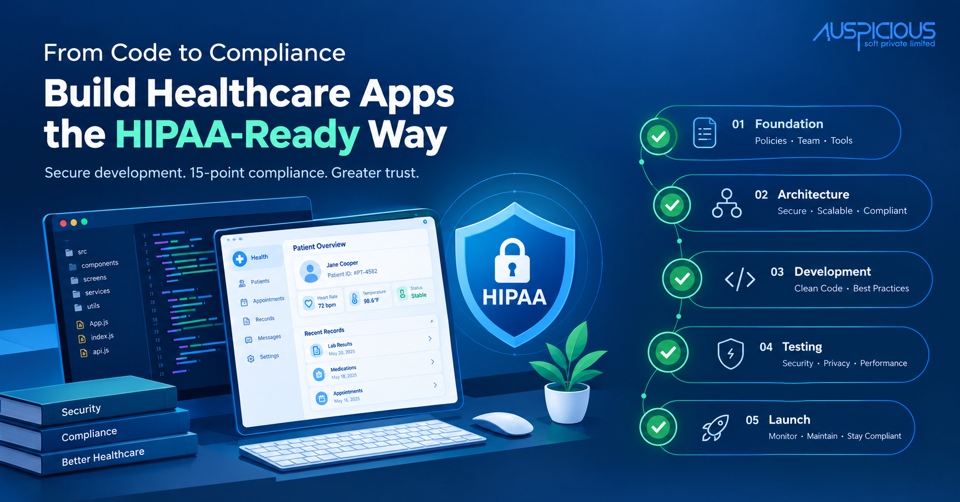
The full checklist at a glance, mapped to the five phases of the development lifecycle. Each point is expanded below with what it actually means in practice.
- Confirm HIPAA applicability and map every PHI/ePHI data flow
- Sign BAAs with every vendor, cloud provider, and partner that touches PHI
- Run a documented security risk analysis
- Choose HIPAA-eligible cloud infrastructure
- Design least-privilege, role-based access control
- Build in data minimization and de-identification
- Encrypt ePHI in transit and at rest
- Enforce unique user IDs, strong authentication, and MFA
- Implement automatic logoff and session timeouts
- Build tamper-evident audit logging
- Add integrity controls for ePHI
- Follow secure coding practices
- Run penetration testing and vulnerability scanning
- Plan backup, disaster recovery, and data restoration
- Establish incident response, breach notification, and recurring audits
Phase 1 — Foundation (Legal and Scoping)
- Confirm HIPAA applicability and map every PHI/ePHI data flow. Before a single line of code, draw the map: where does ePHI enter the system, where does it travel, and where does it come to rest? That includes the obvious places — your database, your API — and the sneaky ones: application logs, message queues, caches, analytics events, and backups. A proper data-flow diagram is the right artifact here, and it pays for itself twice: once as the foundation of your risk analysis, and again when a buyer’s security team asks exactly these questions. You can’t secure data you haven’t located, and the flows you forget are the ones that leak.
- Sign BAAs with every vendor, cloud provider, and partner that touches PHI. A Business Associate Agreement is a legal prerequisite — signed before any third party so much as glimpses ePHI. The list is longer than most teams expect: your cloud host, your development partner, your transactional email and SMS providers, your error-tracking tool (yes, it sees your stack traces), and any analytics platform. Each of these can read PHI, so each needs a BAA. A useful habit is to keep a living vendor register with a “BAA signed?” column and treat an unsigned row as a hard blocker. No BAA, no PHI — ever.
- Run a documented security risk analysis. The Security Rule requires a formal, written assessment of the threats and vulnerabilities facing your ePHI — and “documented” is the operative word, because OCR asks to see it after a breach. Catalog your assets, score each risk by likelihood and impact, and write down the remediation plan with owners and dates. NIST’s SP 800-66 Rev. 2 lays out a method OCR recognizes, so following it gives you a defensible paper trail. Treat the analysis as a living document, revisited at least yearly and after any significant change — the NPRM leans hard in this direction.
Phase 2 — Architecture and Design
- Choose HIPAA-eligible cloud infrastructure. AWS, Google Cloud, and Azure all offer HIPAA-eligible services under a BAA — but “eligible” and “compliant” are not the same word. Only specific services on each provider’s covered list qualify, and the secure configuration is entirely on you. Spin up storage outside the covered pattern, or leave a bucket public, and the BAA won’t save you. Build on the covered services, enable the required controls, and document the architecture so you can prove the setup later.
- Design least-privilege, role-based access control. Bake RBAC into the architecture from the start rather than bolting it on after launch, when it’s ten times the work. Every user and every service account should hold the minimum access its job requires — a billing microservice has no business reading clinical notes. Review roles on a schedule and revoke access the day someone changes teams or leaves. The payoff shows up during an incident: least privilege is what keeps one stolen credential from becoming a full-database breach.
- Build in data minimization and de-identification. The cheapest ePHI to protect is the ePHI you never collected. Pull only the fields you truly need, and set retention limits so data doesn’t pile up indefinitely. For anything that doesn’t require real identifiers — analytics, load testing, ML training, demos — use de-identified or synthetic data instead. Shrinking the amount of live PHI in your system shrinks your breach exposure, your audit scope, and your stress level all at once.
Phase 3 — Development (Technical Safeguards)
- Encrypt ePHI in transit and at rest. Use TLS 1.2 or higher for everything in motion and strong encryption — AES-256 is the standard — for everything at rest, including databases, file storage, and the backups teams routinely forget. Manage your keys with a dedicated service like a cloud KMS rather than hard-coding them, which remains a depressingly common mistake. Since the NPRM moves encryption from “addressable” to effectively mandatory, there’s no reason to treat it as optional today. Encrypt by default, and document your algorithms and key rotation.
- Enforce unique user IDs, strong authentication, and MFA. Every user gets their own identifier — shared logins make it impossible to tie an action to a person, which defeats the whole point of accountability. Require multi-factor authentication for any access to ePHI, and pair it with sensible password policies and account lockouts. Dollar for dollar, MFA is one of the highest-impact controls you can ship, and it’s moving from best practice to explicit requirement under the proposed rule. Build it in now rather than retrofitting it under deadline later.
- Implement automatic logoff and session timeouts. Sessions that touch ePHI should end themselves after a defined stretch of inactivity. This sounds minor until you picture the scenario it’s designed for: a shared workstation at a busy nurses’ station, left logged in while staff rush between patients. A short, enforced timeout closes that window. Tune the duration to the workflow — too aggressive and clinicians will fight you — but don’t skip it.
- Build tamper-evident audit logging. The Security Rule explicitly requires mechanisms to record and examine activity in systems handling ePHI. Log who accessed which record, when, and from where, and make those logs tamper-evident — append-only storage or a dedicated logging service — so they hold up as evidence. Just as important, keep PHI out of the log contents themselves (see mistake #4 below). Good logging is both a compliance checkbox and the first thing you’ll reach for when you need to reconstruct an incident.
- Add integrity controls for ePHI. Implement safeguards that prove ePHI hasn’t been improperly altered or destroyed — checksums, hashing, versioning, and validation on write. This is easy to under-prioritize because it’s invisible when it works, but the failure mode is severe: a clinician making a decision on a silently corrupted lab value is a genuine patient-safety problem, not just a compliance gap. Treat data integrity as a first-class requirement, not a nice-to-have.
- Follow secure coding practices. Most breaches trace back to ordinary application flaws, so work the fundamentals: address the OWASP Top 10, run SAST and DAST in your CI pipeline, scan dependencies for known CVEs, and make security a standing item in code review. Injection, broken authentication, and busted access control are the usual suspects, and they’re all preventable with discipline. Shift this left — catching a flaw in a pull request costs a fraction of catching it in production, and almost nothing next to catching it in a breach report.
Phase 4 — Testing & Pre-Launch
- Run penetration testing and vulnerability scanning. Before go-live, have the application tested by someone who didn’t build it — fresh eyes find what the authors can’t see. Remediate the critical and high findings, document everything, and schedule recurring scans rather than treating the test as one-and-done. There’s a commercial bonus, too: a current pen-test report is one of the first artifacts an enterprise buyer’s security team asks for, so having it ready can shorten your sales cycle.
- Plan backup, disaster recovery, and data restoration. HIPAA requires a contingency plan, and the NPRM gets more specific about restoration timelines, so define yours: recovery point and recovery time objectives, encrypted backups, and a documented runbook. Then — the part teams skip — actually test a restore. An untested backup is a hope, not a plan, and the moment you discover it’s corrupted should not be during a ransomware incident. Run a restore drill on a schedule and keep the results.
Phase 5 — Post-Launch (Ongoing)
- Establish incident response, breach notification, secure disposal, and recurring audits. Compliance doesn’t retire at launch — most of it is operational. Stand up an incident response plan and rehearse it, know your breach-notification obligations and the clock that starts when you discover one, securely wipe ePHI from any media or environment you decommission, and put recurring risk analyses and compliance audits on the calendar. This is the muscle that keeps you compliant as the product changes, the team grows, and the NPRM’s annual-audit expectation becomes reality.
Common HIPAA development Mistakes (And How To Avoid Them)
Compliance failures are rarely exotic. In practice it’s the same handful of avoidable errors, repeated across team after team.
- Assuming “HIPAA-eligible” cloud means compliant. An eligible service with a signed BAA is the starting line, not the finish. Only covered services qualify, and secure configuration is yours to own. Build on the covered list and document every control you switch on.
- Letting PHI reach a vendor before the BAA is signed. The quickest route to a reportable incident is piping ePHI into a tool you never papered. Inventory every third party that could see PHI and confirm the BAA is in place before the first byte moves.
- Treating compliance as a launch gate instead of a lifecycle. Passing a review on launch day means little six months later if risk analyses lapse, patches slip, and new features ship unreviewed. Bake compliance checkpoints into every release and a recurring calendar.
- Logging PHI in plaintext. Logs, crash reports, and analytics events swallow ePHI far more often than teams realize. Scrub or tokenize PHI before it hits a log, and give log stores the same encryption and access controls as your primary database.
- Using production PHI in test and staging. Real patient data in a non-production environment multiplies your exposure for no good reason. Use de-identified or synthetic datasets for development and QA, and keep prod data in prod.
Steer clear of these five and you’ve avoided a surprising share of the breaches and failed audits that sink healthtech products.
Make The Checklist Your Pre-Launch Gate
Treat these 15 points as the gate every healthcare product clears before it ships. Map your data and sign your BAAs, architect for least privilege, encrypt everything, log and test without shortcuts, and build the operational habits that keep you compliant long after launch day. Do that, and HIPAA stops being the thing that derails deals and becomes the credential that wins them — while putting you comfortably ahead of the stricter 2025 Security Rule changes.
HIPAA-ready Healthcare Software Development is as much about disciplined process as it is about clean code. If you’d rather build it right the first time with a team that lives in this world, Auspicious Soft provides HIPAA-focused Software Development Service for US healthtech companies — from secure architecture and BAAs through build, testing, and launch. Run this checklist on your own, or bring it to a conversation with us and we’ll help you turn it into a shipped, compliant product.
HIPAA Software Development FAQs
Q: Is HIPAA compliance a one-time certification?
No — and this trips up a lot of teams. There’s no official government “HIPAA certified” stamp, and compliance isn’t a one-and-done event. It’s an ongoing program of safeguards, documentation, risk analyses, and audits you maintain for the life of the product. Third-party attestations like SOC 2 or HITRUST can support your case, but they don’t replace continuous compliance.
Q: How long does it take to build HIPAA-compliant software?
It depends on scope, but plan for compliance to add meaningful time to a healthcare build — often several weeks to a few months on top of core development for architecture, BAAs, risk analysis, encryption, logging, and testing. The real lesson is the cost curve: building these controls in from day one is dramatically cheaper than retrofitting them after launch.
Q: What’s the difference between HIPAA-compliant and HIPAA-ready?
“HIPAA-compliant” means the software has every required safeguard implemented and running inside a compliant organizational program. “HIPAA-ready” usually means the software is architected and built so a customer can deploy and run it compliantly — the technical foundation is there, but full compliance still depends on configuration and governance in production. This article is about getting you to HIPAA-ready.
Q: Does HIPAA require encryption?
Under today’s Security Rule, encryption is technically “addressable” — you implement it or document a justified alternative. In the real world it’s treated as essential, and the proposed 2025 update moves to make encryption of ePHI mandatory in nearly all cases. The honest guidance: encrypt everything, everywhere, by default.
Q: What happens if my app isn’t HIPAA-compliant?
Non-compliance exposes you to civil penalties reaching into the millions per year, potential criminal liability for willful violations, mandatory breach notifications, and lasting reputational damage. And that’s before the commercial hit: many healthcare buyers won’t even open a procurement process without proof of compliance, so non-compliance quietly costs you deals you never see.
Q: Who’s responsible for compliance — us or our development partner?
Both. As a business associate, you’re directly liable, and your Software Development Service partner is also a business associate bound by a BAA. Responsibility is shared and should be spelled out in the contract, but regulators can hold each party accountable for its own safeguards. Choose a partner who treats that liability as seriously as you do.